
Key management
What this page covers
Section titled “What this page covers”Sensitive data at rest uses layered envelope encryption: data is encrypted with a data key, and the data key is wrapped by the master key. This page explains where the master key lives, how to read the inventory, and which procedure to follow to change a key. Every rotation is a manual action; the system never changes a key on its own.
How the master key and the data key protect the secret1 / 5
- The data key (DEK) seals the password as ciphertext. Disk never holds it in the clear.
- The data key itself is wrapped by the master key (KEK). That is the two-layer envelope.
- The master key is not written to the database. It lives on the unseal page, in the environment file, or at a cloud key service.
- To use the password, the backend unwraps the outer layer with the master key before it can reach the data key.
- Changing the master key rewraps the outer layer only. The inner ciphertext is not rewritten.
Where the password goes during a connection: SSH terminal
Custodian credentials, handed over at unseal4 / 4
- In delegated mode the service starts sealed, waiting for an administrator to finish the unseal flow.
- The administrator verifies credentials first, then checks the custodian destination.
- The administrator enters the custodian credentials at the unseal step. The system holds them in memory for this unseal generation.
- After unseal the service offers its functions. Custodian credentials are not written to the deployment file or disk; a seal clears them, and a restart needs them supplied again.
Three master key modes
Section titled “Three master key modes”The mode comes from KEK_PROVIDER in .env.
env: material in the environment file
Section titled “env: material in the environment file”ENCRYPTION_KEY holds a 32-byte key, accepted in three forms: 32 alphanumeric characters, 64 hexadecimal characters, or base64 that decodes to exactly 32 bytes. Generate one either way:
openssl rand -hex 32openssl rand -base64 32ui: material in memory only (the shipped default)
Section titled “ui: material in memory only (the shipped default)”After startup the system is sealed, every route besides the health check and the seal endpoints returns 503, and service begins once the material is entered on the unseal page. The material is generated locally in the browser and never reaches disk. On every mode, the unseal page verifies local administrator credentials first; the material field or the custodian-credential field appears only after that check passes. Consecutive failures back off exponentially, and the next attempt is allowed when the cooldown ends, with no restart. When initialization times out, retry with the same key you entered the first time rather than a new one.
Setting SEAL_UNSEAL_BIND_ADDR gives the unseal endpoint its own listener, and SEAL_UNSEAL_ALLOWED_CIDRS limits which source ranges may unseal.
kms: delegated to a cloud key service
Section titled “kms: delegated to a cloud key service”.env keeps only KEK_PROVIDER=kms and KEK_KMS_PROVIDER (aws, vault, or gcp).
The custodian address, Transit key name, role identifier, region, and key reference are written to the database from the Key management page and the rewrap wizard.
Old environment-variable names that no longer take effect are written into the database once on first start and recorded in the log (values are not logged).
Custodian credentials (the cloud key service access secret, service-account key material, a Vault secret, or a token) are entered only on the unseal page,
live only for that unseal, are cleared on seal, and do not enter the deployment file or disk.
After a restart or a seal in delegated mode, the host stays on the unseal page: an administrator checks the topology, then hands over the custodian credentials there.
Wrapping and unwrapping of data keys is done at the custodian; data and asset passwords are not sent out. Vault uses AppRole or a token (renewed while unsealed). Key versions turn at the custodian; changing a key, and moving between local and delegated, go through the rewrap wizard. The primary and the replica of a multi-region key count as two keys, so switching to the replica is a key change and needs a rewrap first.
A fresh install can run delegated initialization before service starts: four steps on the unseal page collect the administrator, the topology, and the custodian credentials, then wrap and store the key.
The key inventory
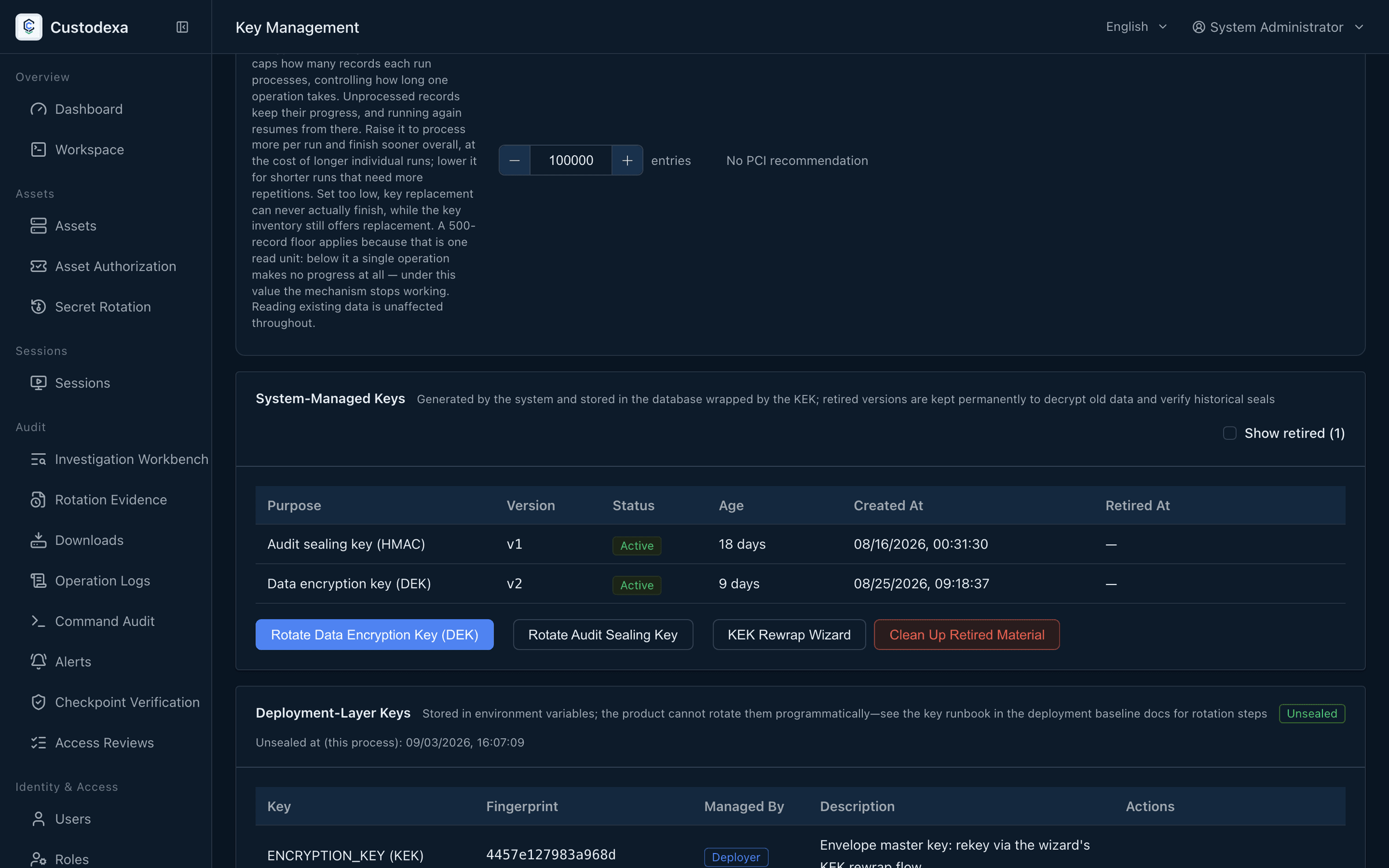
Section titled “The key inventory”The Key management page on the administration side lists every key with its fingerprint. Fingerprints are computed one way, so you can check them yourself:
echo -n <JWT_SECRET> | sha256sum # take the first 16 hexadecimal charactersKeys on the environment variable side show a fingerprint and who manages them. The delegated mode replaces the material fingerprint with a normalized external key reference.
The ui mode also shows the seal state. When the policy key “key age reminder days” is set above 0, an aged key carries a reminder in the inventory.
Sealing a running system
Section titled “Sealing a running system”An administrator can seal a running system from Key management: new key use stops, holders finish, and the cache is cleared.
Sealing cuts connections that are still using a key. The way back depends on the mode: ui re-enters the material, env reads the deployment environment,
and delegated mode checks the topology on the unseal page and hands over the custodian credentials.
How long a data key stays in memory
Section titled “How long a data key stays in memory”The policy key “data key cache lifetime in seconds” lives under Key management policy. Empty is the shipped value for every mode, and means keep until seal or restart;
0 means fetch from the custodian every time, with nothing kept; a positive integer is a fixed number of seconds from a successful unseal, and is not extended by reuse.
The audit stamping key and the signing private keys are not covered by this key. A seal clears the cache at once. Measurements: Retention, purging, and observability.
How to change a key
Section titled “How to change a key”Rewrapping the master key
Section titled “Rewrapping the master key”Open the rewrap wizard on the key management page to have the data keys wrapped by a new master key. Retirement is soft: the old material is kept until it is cleared explicitly, and that clearing is the only point where material is destroyed.
How you complete the switch depends on the mode:
env: write the new value intoENCRYPTION_KEYin.envand restart.ui: restart, then enter the new master key on the unseal page, and do not write it into.env.kms: in the rewrap wizard choose a custodian (AWS KMS, Vault Transit, or Google Cloud KMS) and write the topology. The inventory shows kms as the manager, and the key reference is that custodian’s canonical name (an ARN, a Transit key name, or a CryptoKey resource name). Custodian secrets are supplied only on the unseal page.
Migrating from local material to a delegated custodian: choose the target custodian in the rewrap wizard and write the topology, set KEK_PROVIDER=kms,
remove the local material, and restart. After restart the host stays on the unseal page to check the topology, hand over the custodian credentials, then confirm the inventory. Remote rotation of the same key version is done by the custodian’s administrator.
Data keys and the audit stamping key
Section titled “Data keys and the audit stamping key”Choose the key on the key management page and rotate it. It takes effect immediately, with no restart and no interruption to existing connections. Older ciphertext is decrypted by the matching key version, and the version chain is kept. The system stops the action while a key operation is running, a rewrap is in flight without its switch, or the in-process key cache has expired.
The JWT secret
Section titled “The JWT secret”Change JWT_SECRET in .env and restart, with at least 32 bytes. Everyone signs in again afterwards.
The two signing keys
Section titled “The two signing keys”The export signing key signs an evidence bundle as a whole, and the checkpoint signing key signs the audit chain; they are deliberately separate. The public keys can be copied or downloaded on the key management page, and each has an endpoint of its own for outside verifiers. After changing the export signing key, send the new public key to your outside verifiers.
Notification channel secrets
Section titled “Notification channel secrets”Edit the channel on the notification channels tab of the alerts page, enter the new secret, and save; update the verification secret on the receiving side at the same time, then press “Test send” once to confirm the receiver gets it and the signature verifies. It takes effect immediately, with no restart.
Common checks after a rotation
Section titled “Common checks after a rotation”- The fingerprints changed as expected, and your own records are updated.
- Every enabled notification channel gets one test send, confirming the receiver really got it.
- The rotation can be found in the audit records.
- For keys on the environment variable side, the startup log after the restart holds no refusal to start.
What auditors can see
Section titled “What auditors can see”- Creating, rotating, rewrapping, and clearing retired material all leave records, and the clearing also records how many entries were cleared and the fingerprint of each version.
- The inventory is control evidence in itself: which keys exist, who manages them, what their fingerprints are, and when each was last rotated.
- In the
uimaster key mode the inventory shows the seal state, which supports the claim that the service is not running on unprotected material. - A change to the custodian topology records the before and after values and raises a security alert. Administrator verification and custodian-credential entry on the unseal page leave a trail.