
Command rules and blocking
What this page covers
Section titled “What this page covers”Control does not end when the connection is established. A command that matches a rule can be stopped where it stands, without waiting for a report afterwards; one that is not stopped can still leave an alert for someone to review. Rules are split by protocol, because shell and SQL were never written the same way.
How to set it up
Section titled “How to set it up”Go to the rule management tab of the Alerts page and add a rule:
- Rule name, for example “delete the root directory”.
- Match rule: a regular expression, for example
rm\s+-rf\s+/. It is compiled and checked when you save, and a mistake is reported with its position. - Severity: high, medium, or low.
- Action: alert or block.
- Protocols: several can be picked, and picking none means every protocol. The choices are SSH, container exec, MySQL, PostgreSQL, Redis, and SQL Server.
With “block” chosen, the matching line never reaches the target host, the terminal receives a readable warning, the block is recorded, and the alert is pushed as usual. Matching for a block happens in interactive line mode.
The system ships with a few dangerous database rules: SQL rules such as dropping a table, dropping a database, truncating a table, and granting all privileges, along with a Redis rule for flushing data, each confined to its own protocol.
A rule can match input or output and target people or AI agents. Output rules alert on sensitive content. Agent-specific rules and out-of-scope probing breaker events appear in Alert records. Access to sensitive originals can also generate a policy-controlled alert.
What you see after a block
Section titled “What you see after a block”A block appears in three places with the same content: in the recording of the connection, on the screen of an auditor watching live, and in the audit records. Alerts are written through the same path as the matching, so log forwarding covers them too.
Alert records
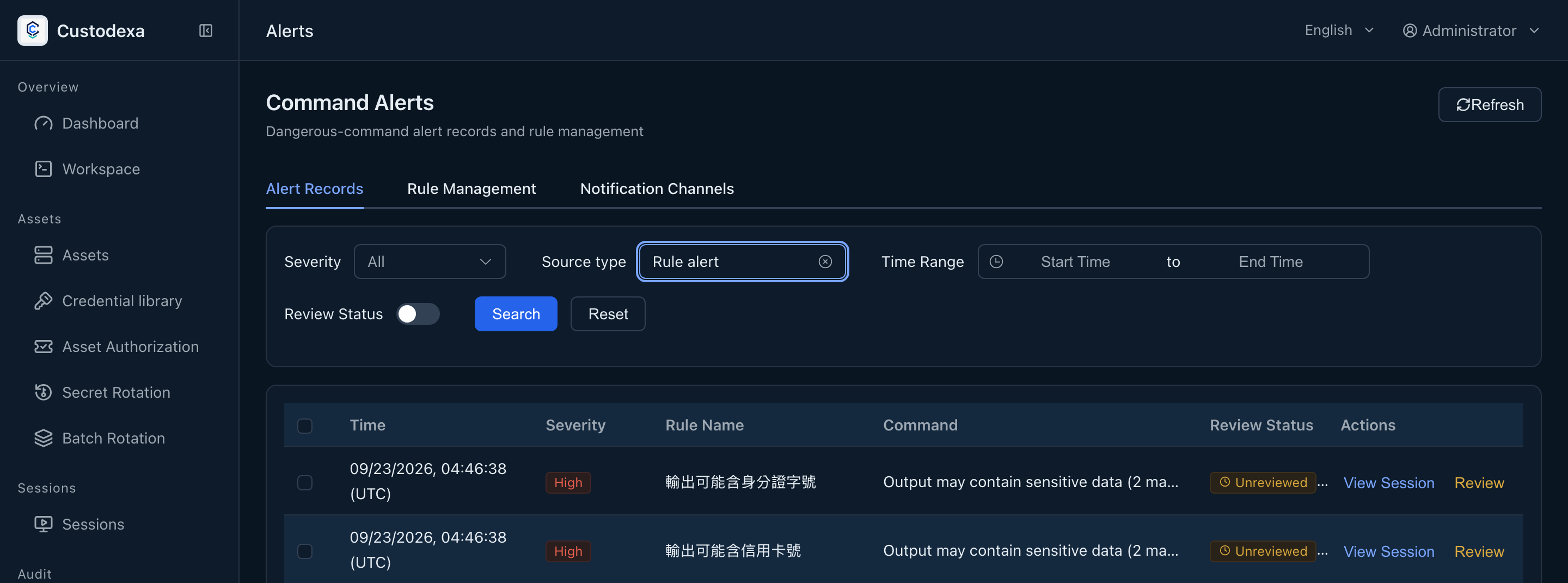
Section titled “Alert records”The alert records tab filters by severity, user, asset, and time range, and can show only the unreviewed ones.
Each record keeps a snapshot of the rule name and severity as they were when it fired, so renaming or deleting the rule later leaves the historical records readable. Besides rule matches, command-audit downgrades, new source addresses, agent probing breakers, and access to sensitive content can generate named alerts.
Review a record with the Review button on its row, choose false positive or escalate, and add an explanation if you want. A disposition can be redone, which is how a misjudgment gets corrected. See Daily review and second review.
Select up to 50 alert records for batch review with a shared reason and disposition. Review each result and requery pending rows after a partial completion. Alerts triggered by the reviewer follow individual review.
Sending them out
Section titled “Sending them out”Alerts can go to a webhook or to Slack. The JSON a webhook receives holds the alert itself, the rule it matched, and the session context (session identifier, user, asset, source address). See Log forwarding and notifications for how to set this up.
What auditors can see
Section titled “What auditors can see”- Alert record fields: the rule name and severity snapshot, user, asset, command text, and the time it fired, along with the reviewer, review time, disposition, and note.
- A block is recorded with the same structure, and notes additionally that the command was stopped rather than let through.
- Adding, changing, and deleting a rule leaves a record, and the change takes effect immediately.
- A review disposition leaves a record with its classification.