
Offsite evidence storage
What this page covers
Section titled “What this page covers”While the evidence sits on the same machine as the system, whoever holds that machine holds the evidence too. Offsite storage uploads copies of recordings and evidence bundles to the organization’s own object storage, records each item in a ledger, and confirms the hash and size match before handing anything back. After the local copies are cleared, playback and export go on as before.
What you need
Section titled “What you need”- An S3-compatible or Google Cloud Storage bucket, created by the deployer.
- A credential with write and read permission.
- Versioning, retention, and lifecycle rules on the bucket, set by the deployer; see Backup and restore for suggestions.
How to set it up
Section titled “How to set it up”The Offsite storage page has two sections:
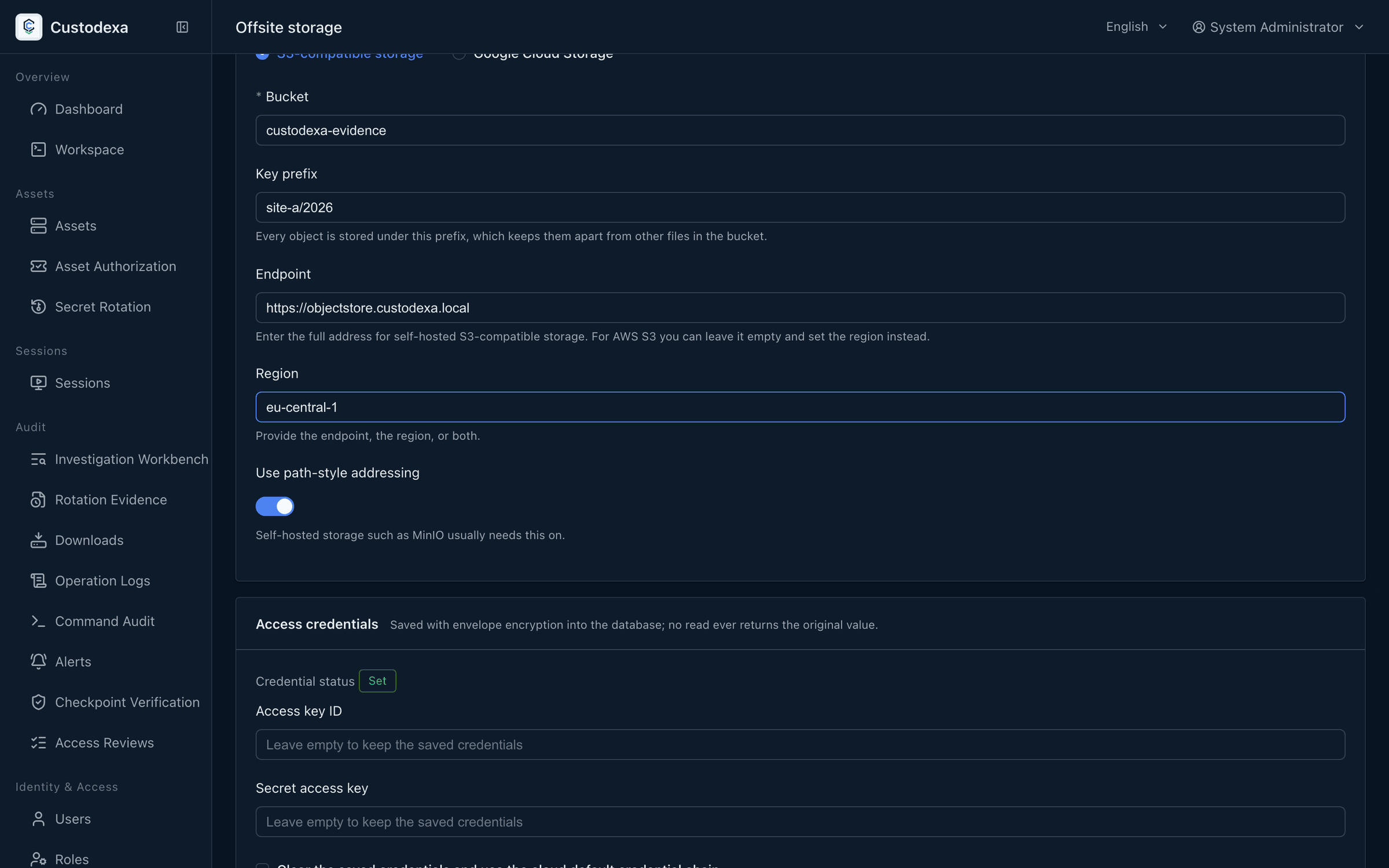
Storage location
Section titled “Storage location”The storage service (S3-compatible or GCS), endpoint address, bucket, path prefix, region, and whether to use path-style addressing, which self-hosted object storage usually needs.
Access credentials
Section titled “Access credentials”For S3, fill in the access key ID and secret key; for GCS, the service account JSON. Credentials can be overwritten but never read back: they are written under envelope encryption as soon as they are saved, no read returns the original, and the interface shows one of four states: set, using the cloud default credential chain, revoked, or unset. Leaving them empty keeps the stored credential; clearing both fields and removing the existing credential switches to the cloud default credential chain.
Changing the storage service, endpoint, or bucket requires the credentials to be entered again before you can save.
Test before you save
Section titled “Test before you save”“Test connection” uses the current values in the form, with no need to save first. The test runs two groups of steps: the state of the bucket (reachable, versioning, retention settings) and a real write and retrieval (write, read back and compare, delete the test object). Each step is reported as passed, could not be determined, failed, or not run. After any field changes, the previous test result is marked as needing a rerun.
Switching generations
Section titled “Switching generations”Changing where things land creates a new storage configuration generation. When the ledger already holds objects, a confirmation dialog appears before saving, listing how many objects are affected and what becomes of the previous generation. The previous generation’s credentials are kept so that existing objects can still be retrieved.
“Stop offsite storage” stops new uploads and turns the current settings into a historical generation; existing objects are still retrievable, credentials are not revoked, and nothing is deleted on the storage side. “Revoke credentials” makes that generation’s objects unretrievable, cannot be undone, and the interface says so first.
Retention of the local copy
Section titled “Retention of the local copy”Shipped as 0, which means no early clearing. Set above 0, the local copy of a recording that has been uploaded is cleared on expiry, the ledger marks the local copy as cleared, and playback is served from the offsite copy.
Queue and retries
Section titled “Queue and retries”The custody queue on the page lists the counts for pending, uploading, uploaded, failed, integrity mismatch, previous storage configuration, and local copy cleared, and says whether an item is a new upload or a catch-up, along with the longest wait.
The upload failure list is ordered by how close each item is to the end of its retention, and each row shows the kind, the object, the last attempt time, the reason, the attempt count, and the days left before retention ends. Retries can be run for the batch or row by row.
What auditors can see
Section titled “What auditors can see”The custody ledger is the current state, and the audit events are the trail. The following events are written to the audit records under the system’s identity:
- A successful upload, a failure after the retry ceiling, and stuck items.
- Local clearing at the end of retention.
- Content on retrieval that does not match what was uploaded.
- A storage configuration generation switch, and stopping offsite storage.
- Revoking the credentials of a historical generation.
Each one holds the ledger object identifier, kind, owner, bucket, and object key, plus the hash, size, result, and reason code where they apply, and holds neither the endpoint nor the credentials. Generation events hold the old and new generation identifiers, their fingerprints, and the number of objects affected.
The session detail page shows the offsite state per session, covering not queued, pending, uploading, stored offsite, upload failed, integrity mismatch, local copy cleared, and previous storage configuration, each with an explanation.
When upload failures reach the ceiling, the offsite upload mechanism family reports a failure alert, which lifts once the failure count returns to zero. The end of retention clears the local file and marks the ledger, and the system issues no delete call against the remote object.