
LDAP and AD
What this page covers
Section titled “What this page covers”Letting users sign in with the accounts that already exist in the corporate directory, instead of building a second set. The directory settings live in the database and are maintained by an administrator in the interface, connection test included. A change takes effect immediately, with no restart.
What you need
Section titled “What you need”- A directory server this system can reach, preferably over
ldaps://. - A read-only service account for the bind.
- A starting point and a filter for the user search.
How to set it up
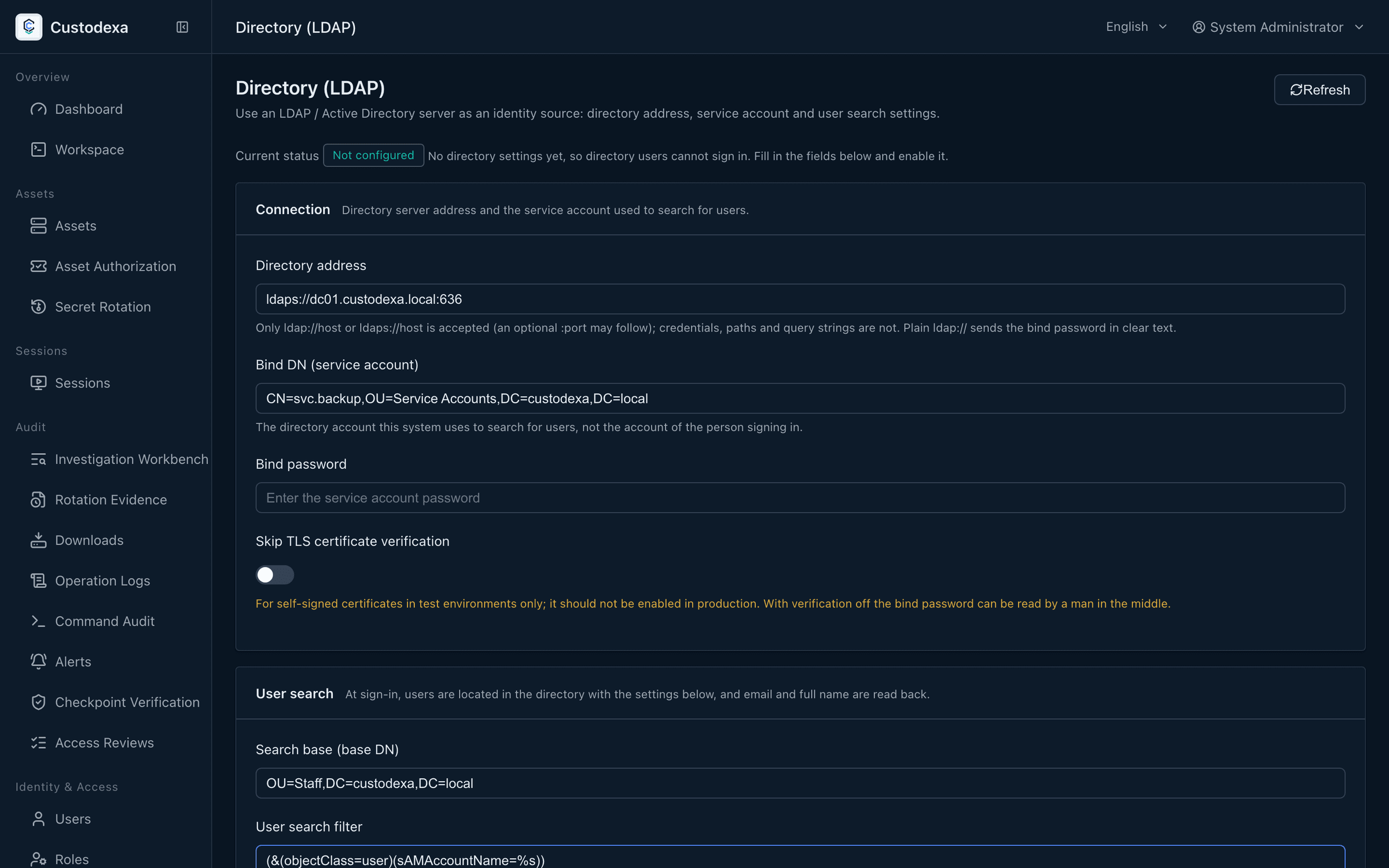
Section titled “How to set it up”Directory and single sign-on now sit under External group mappings. The two mapping targets, sign-in synchronization, and how an empty set differs from an unknown result are on that page. The old Directory settings address still opens this page; fill connection and search in the three sections.
Connection
Section titled “Connection”- Directory address: of the form
ldaps://dir.example.com:636, accepted as host and port only. - Bind DN and bind password: the service account. The password is stored under envelope encryption, and afterwards the system reports it as set without returning its content.
- Skipping TLS certificate verification is available as a checkbox.
When you change the directory address while a password is stored, the system asks you to enter the password again, or to tick the box that clears the stored one.
User search
Section titled “User search”- The search base DN.
- The user search filter, for example
(&(objectClass=user)(sAMAccountName=%s)).%sappears exactly once and cannot sit inside an OR or a NOT; this is checked when you save. - The mail attribute (
mailby default) and the name attribute (cnby default).
Activation and display name
Section titled “Activation and display name”Fill in the display name and turn on “Enable directory login”. Activation requires the address, the bind information, the search criteria, and both attributes to be complete.
Test connection
Section titled “Test connection”“Test connection” uses the current values in the form, including changes you have not saved, and takes up to about 15 seconds. A failure returns a diagnostic code, which is also written to the audit record and the server log.
A directory user’s first login
Section titled “A directory user’s first login”The first time a directory user signs in successfully, the system creates the matching local record, marks its source as LDAP, gives it the ordinary user role, and leaves it without a usable local password.
The directory variables in .env seed the settings once at first start, after which the interface is the single source of truth.
Transmission security
Section titled “Transmission security”The transmission security policy has an enforcement level for the LDAP channel. Set to warn and record, a login over a cleartext channel goes through as usual while each one leaves a transmission deviation record; set to strict refusal, a directory login over a cleartext channel is blocked with an explanation. Local accounts are unaffected by this setting.
What auditors can see
Section titled “What auditors can see”- Creating, updating, and deleting the directory settings, along with attempts that were refused, all leave records, and none of them hold the password.
- A change of directory address is recorded as a high-weight event, with the normalized address before and after and whether the host changed.
- Login records note the authentication source, so they can be told apart from local logins.
- When the settings fail to parse the system refuses, and the record shows that it was a parse failure rather than a wrong password.