
Query console
What this page covers
Section titled “What this page covers”A graphical interface for people who need to read table structures, run queries, and export results, which turns every statement into evidence at the same time. Statements are sent verbatim, the audit record is written before execution, and a statement whose audit record cannot be written does not run.
What you need
Section titled “What you need”- A MySQL, PostgreSQL, or SQL Server asset, created as described in Database command line.
- Connection authorization for that asset. The console and the command line use the same connection ticket and the same gates.
How to set it up and use it
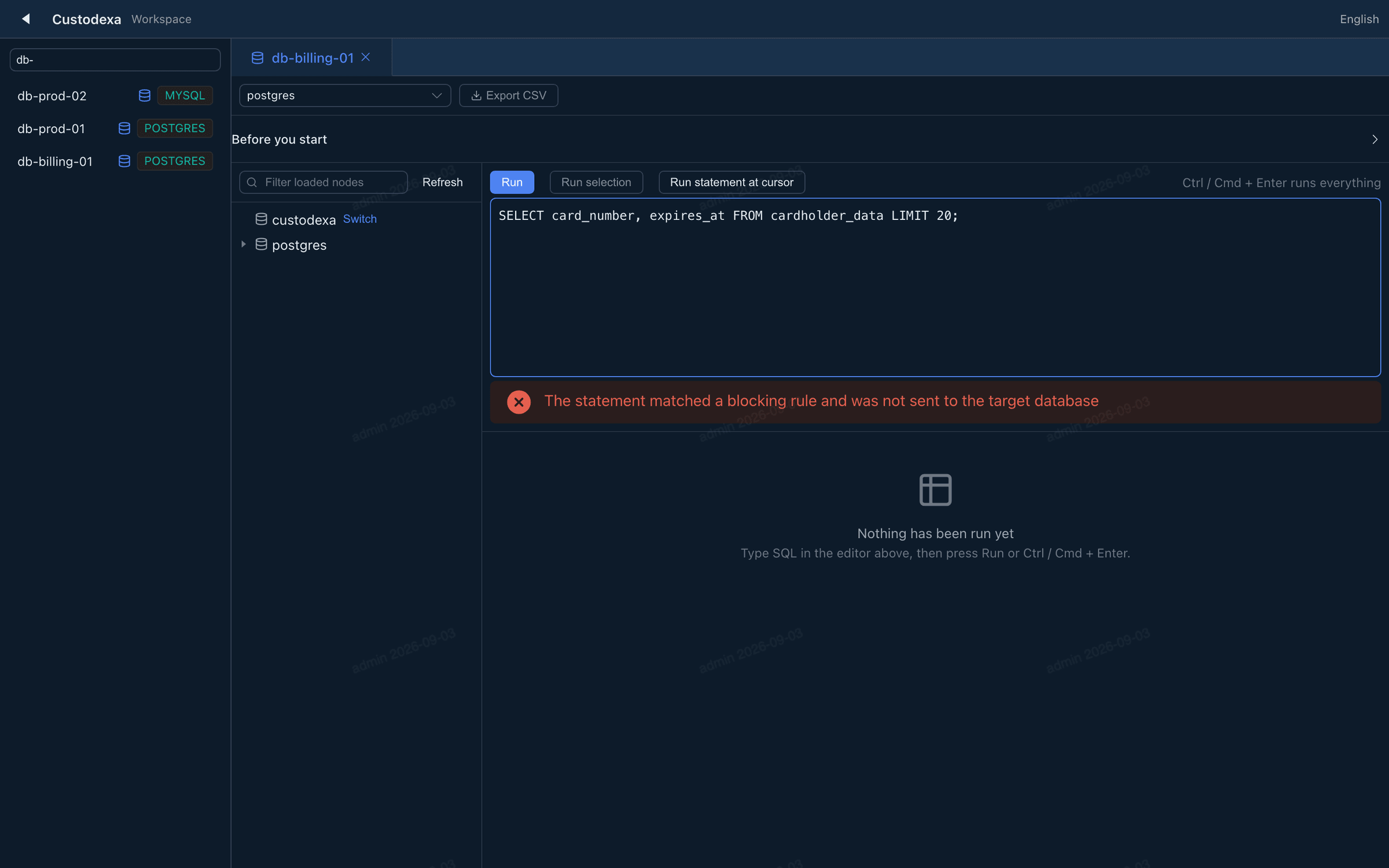
Section titled “How to set it up and use it”In the workspace sidebar, a supported database asset row carries a Console button that opens a console tab. Clicking the row itself still opens a command line tab, and both kinds of tab can be open on one asset at once.
The screen has three areas:
- Left: the database tree. It loads level by level, and the filter box narrows the nodes already loaded without sending another query.
- Middle: the statement editor. Run everything, run the selection, or run the statement under the cursor, and cancel a run. Ctrl or Cmd plus Enter runs everything.
- Right: the result grid.
Switching databases asks for confirmation first, because it rebuilds on a new connection and closes the current one.
Each session is a single connection, with no pool and no automatic reconnect. On a disconnection the tab grays out, the text in the editor stays, the results are cleared, and the interface says that what follows is a new session. For a statement that was running at the moment of the disconnection, the interface marks the result as unknown and offers a way to view the audit records and copy the event identifier.
Closing a tab with an unfinished statement or an uncommitted transaction asks for confirmation.
Console sessions open at once have a ceiling: 4 per person and 64 across the system.
Restricting the reachable databases
Section titled “Restricting the reachable databases”Fill in the “allowed databases” field of the asset form; empty means no restriction. Once filled, the database tree lists only the databases on the list, and a target outside it is refused. The list is read again before each database listing, each switch, and each execution unit, so narrowing it takes effect immediately.
Exporting results
Section titled “Exporting results”“Export CSV” exports the result set currently in view. What is exported is what is on the screen, and the query is not run again. The export is governed by the “download files from the asset” policy key, revalidated on each one. In the CSV, a cell a spreadsheet would read as a formula gets a leading apostrophe, plain numbers are untouched, and the dialog explains this rewrite.
An AI agent can use the managed MCP query tool on approved database assets. Each call also enters the tool call ledger; statements follow the same query-console policy and structured audit.
What auditors can see
Section titled “What auditors can see”- Each execution unit gets an event identifier that runs through the audit records, the server-side transcript, and the exported file.
- A statement record holds the target database, the statement text, the result state, the reason code, rows returned, rows affected, number of result sets, the target’s error code, and the elapsed time.
- The session appears in the session list, the live view, and the investigation workbench, alongside the other protocols.
- The transcript recording notes each execution unit’s target database, event identifier, statement text, and result summary, and holds no result rows.
- A successful export records the session, event identifier, row count, size, and a content digest; a refused one leaves a download refusal record; a stream cut off partway records the bytes already sent and their digest.
- Every export request that does not hold up gets the same outward response, and the real reason goes only into the audit records.