
Open source privileged access gateway / session auditing / credential rotation
Who connected to what, and what they did. The recording decides.
The browser is the entrance, and target hosts install nothing. Every connection passes policy and leaves a recording; dangerous statements can be blocked. The recording is the source of truth for text sessions, and input without echo leaves no command-text record. Auditors can take a verifiable signed evidence bundle.
sha256sum --ignore-missing -c SHA256SUMS
sudo tar -xzf custodexa-1.13.0.tar.gz -C /opt
sudo /opt/custodexa/custodexa.sh install
- Connection
- Evidence
- Rotation
- Block
- 01Authentication gateMFA, single sign-on, directory services, break-glass tickets
- 02Policy engineDirect, reason required, or approval required, with authorization you can trace
- 03Protocol proxyCredentials terminate here, statements are matched, nothing to install
- 04Credential rotationScheduled password changes on Linux and Windows, with a rotation report
- 05Recording and auditSession recording, a trail of commands and statements, checkpoints
When the auditors arrive, you hand over evidence, not explanations.
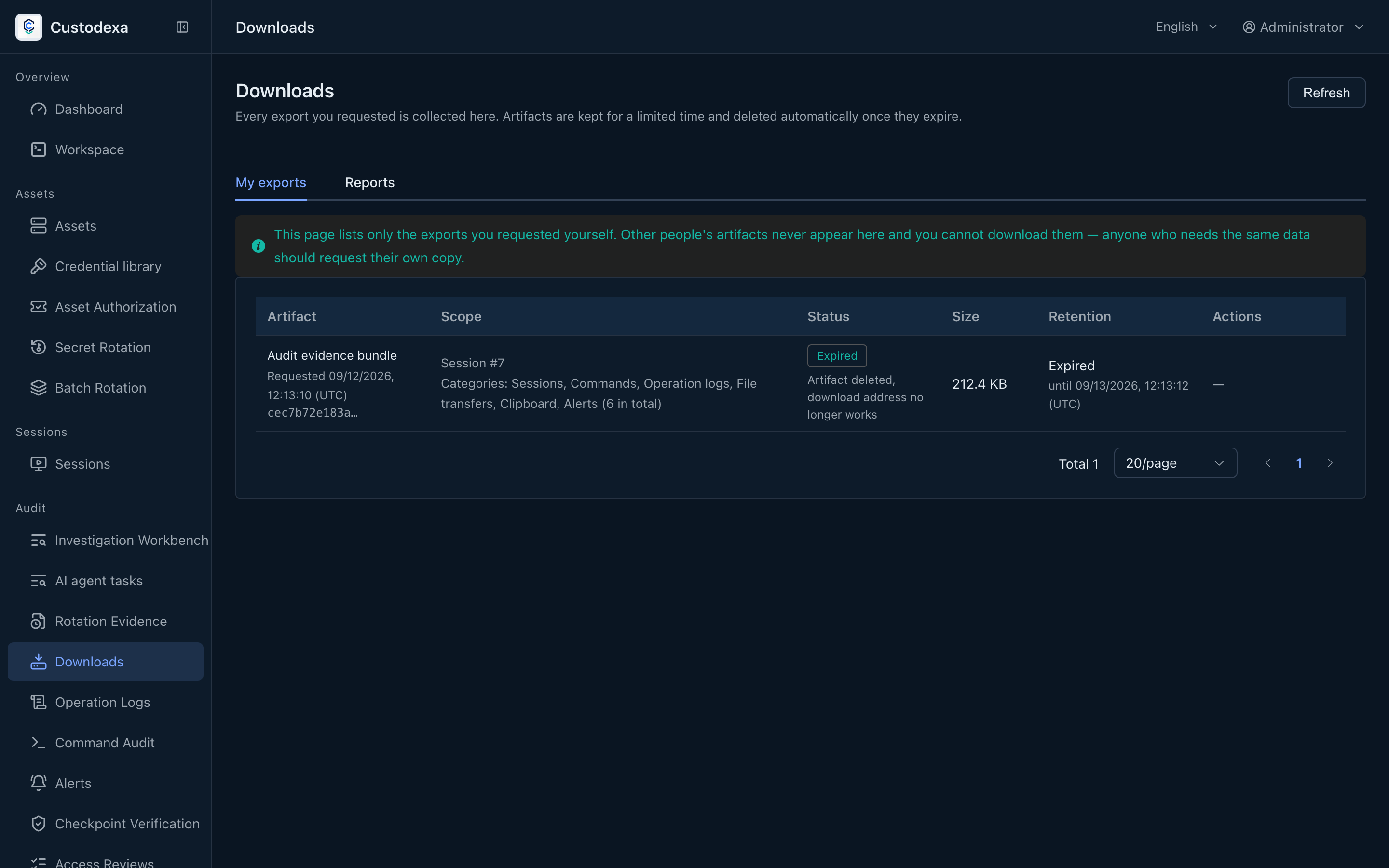
Export recordings and audit records for the investigation scope. The manifest states the scope of included records, retention coverage and truncation. Signed bundles can be verified offline.
Session timeline
manifest.json / the manifest is being written
{
"mode": "evidence_bundle",
"job_id": 1842,
"exported_by": "auditor.lin",
"exported_at": "2026-09-04T00:52:10+08:00",
"filter": { "user": "ops.chen" },
"files": [
{ "name": "sessions.csv", "sha256": "9f3c…a41e" },
{ "name": "commands.csv", "sha256": "b07d…c9f2" },
{ "name": "alerts.csv", "sha256": "12e8…77b0" },
{ "name": "recordings/session-42.cast",
"sha256": "e5a1…03cd" }
],
"counts": { "session": 1, "command": 37 },
"coverage": [ { "type": "session" } ],
"signed": true
}
SIGNED
evidence-1842.zip
sessions.csv
commands.csv
alerts.csv
recordings/session-42.cast
manifest.json
manifest.sig
The manifest is written last, and the per-file hashes ship alongside the signature for the whole package.
manifest.json / the manifest is being written
- "mode": "evidence_bundle",
- "files": [ … 4 ],
- "signed": true
evidence-1842.zip
sessions.csv
commands.csv
alerts.csv
recordings/session-42.cast
manifest.json
manifest.sig
The manifest is written last, and the per-file hashes ship alongside the signature for the whole package.
Ten core capabilities
Each card explains a use case, mechanism, and evidence. Cards with screenshots show the product interface.
01
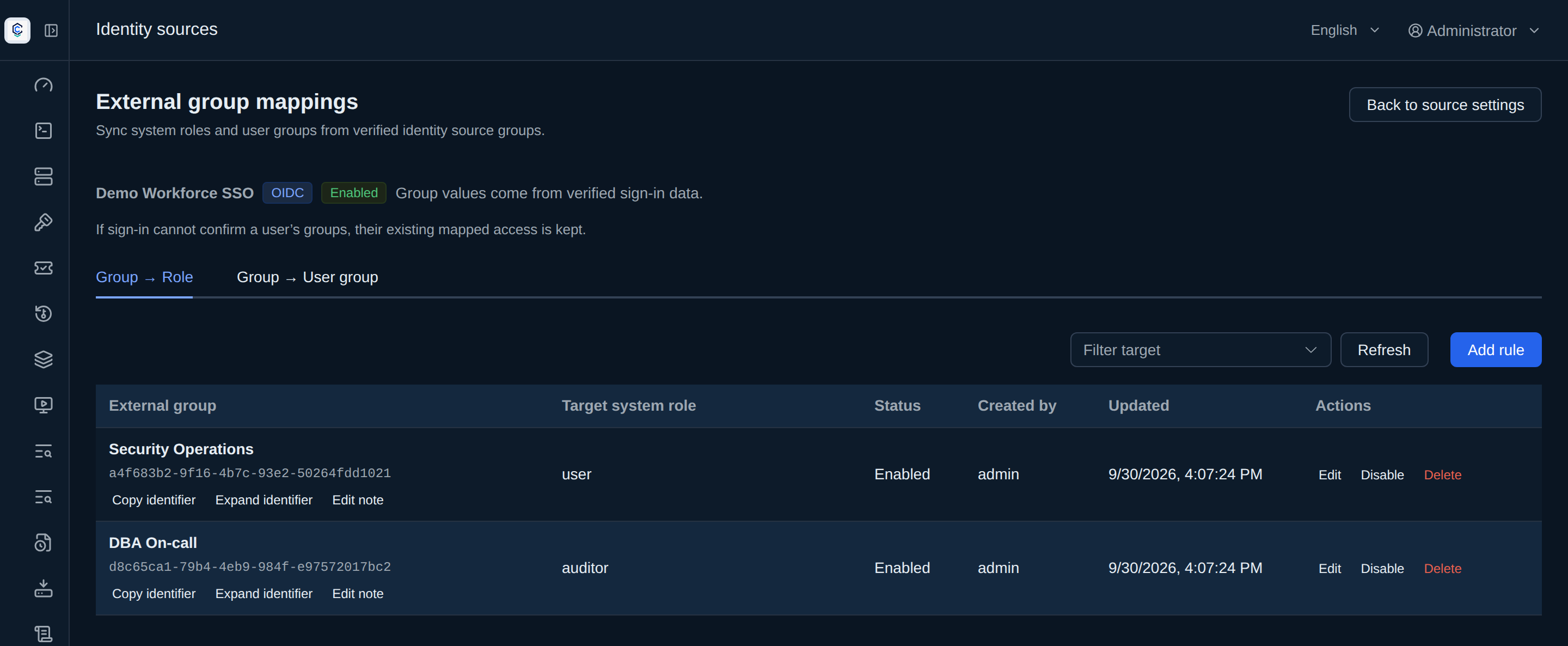
Who can come in is decided by the directory
If you skip thisAfter people leave, their roles stay on the platform and someone has to clear them one by one.
MechanismExternal groups map to roles or user groups on each sign-in. Manual roles and memberships are kept separately.
EvidenceEach rule shows who created it and when it last changed. Disabling a rule immediately removes any access that no other rule still grants.
02
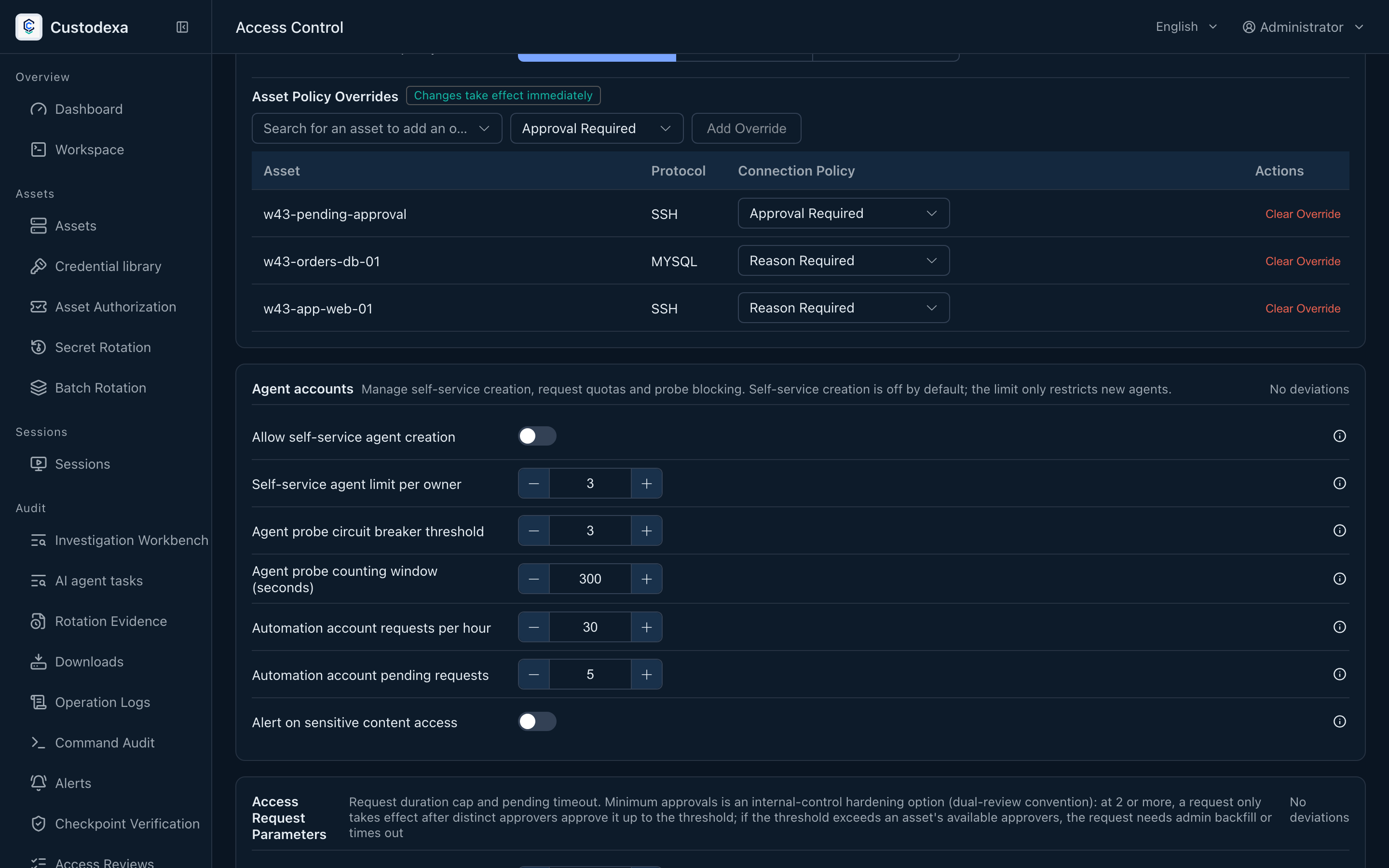
A connection goes through policy before it gets authorization
If you skip thisNobody can answer why this person can connect.
MechanismEvery asset has three tiers: connect directly, fill in a reason, or wait for a person to approve. The moment approval lands, a time-limited authorization is already there.
EvidenceThere is an answer from the person and from the asset. Approval records can be looked up later.
02
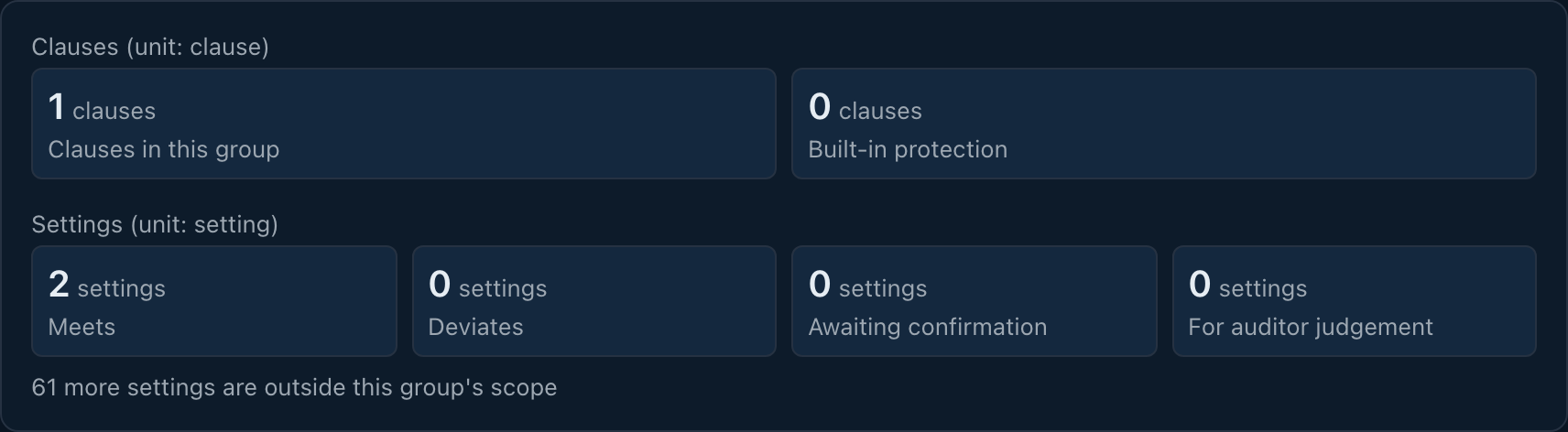
Internal rules and an external baseline, compared on one table
If you skip thisWhen audit asks why this setting has this value, the answer has to be pieced together from settings pages.
MechanismPolicy groups are data: built-in baselines and organisation-defined groups sit side by side, and each requirement maps to a live setting.
EvidenceThe compliance map gives five verdicts. The settings page, the drawer, and the map read the same answer.
03
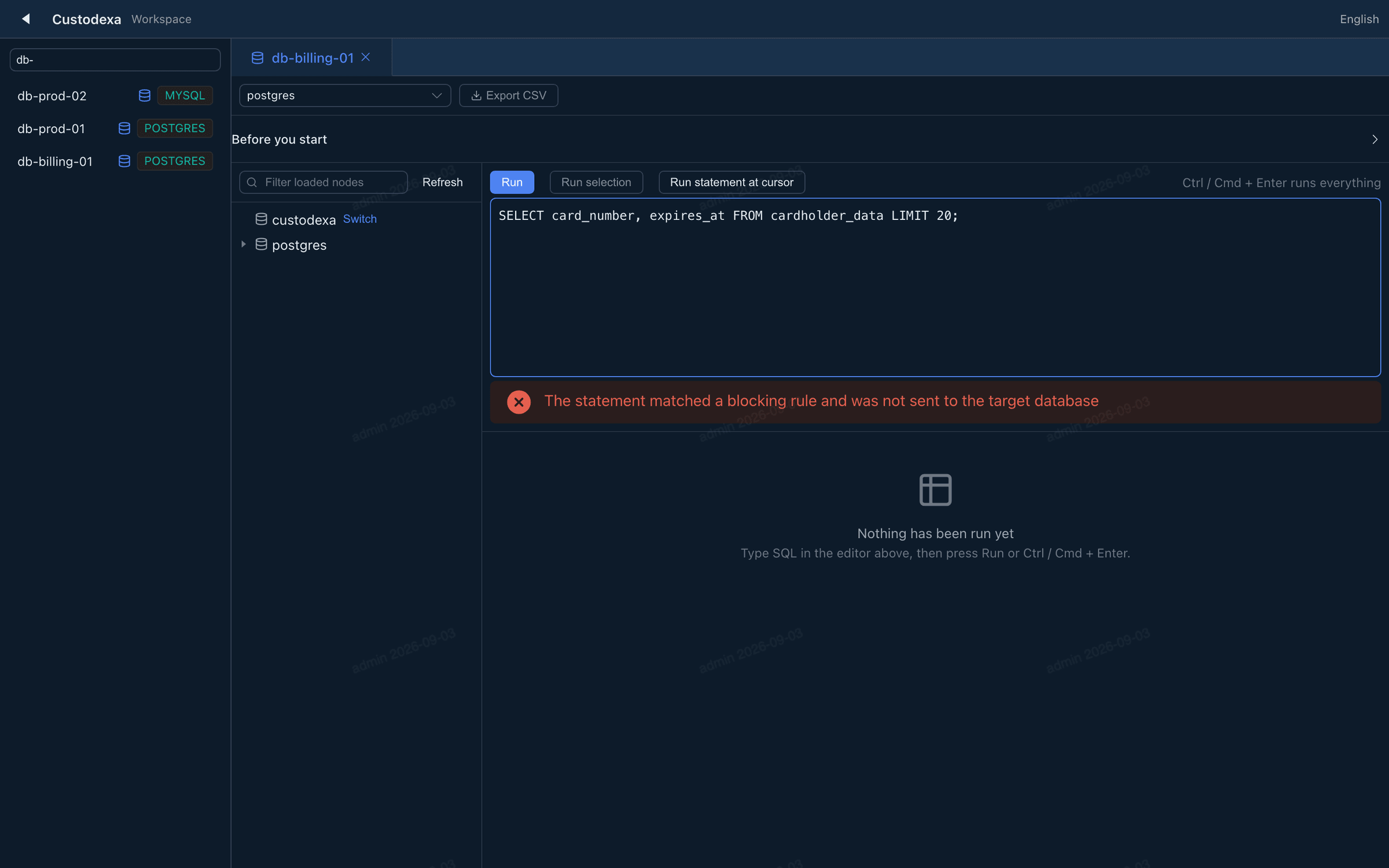
Statements matching a blocking rule are stopped before execution
If you skip thisA DROP TABLE is only seen in the log after it has already run.
MechanismThe query console records statements before execution. Statements matching a blocking rule for the protocol are not sent to the target; allowed statements are sent verbatim.
EvidenceThe blocked statement and the original text both stay in the session records.
03
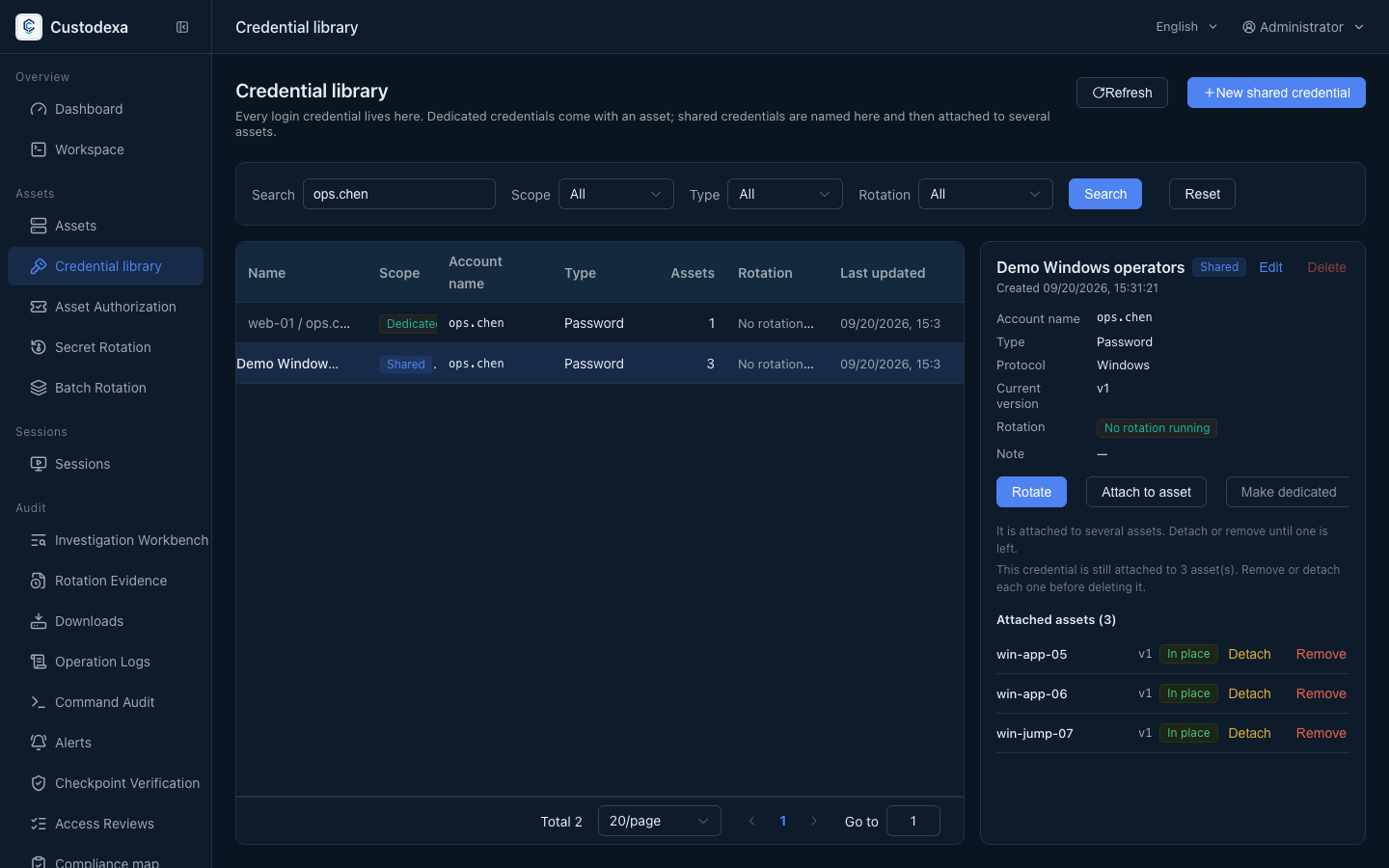
Login passwords are managed centrally; connection secrets are retrieved in the backend
If you skip thisThe same password is copied across asset forms, and changing it means hunting them down.
MechanismThe credential library holds the secrets. Asset accounts only mount them. During a connection the password appears only in the backend handshake.
EvidenceEach credential shows which hosts mount it and which version each host is on.
04
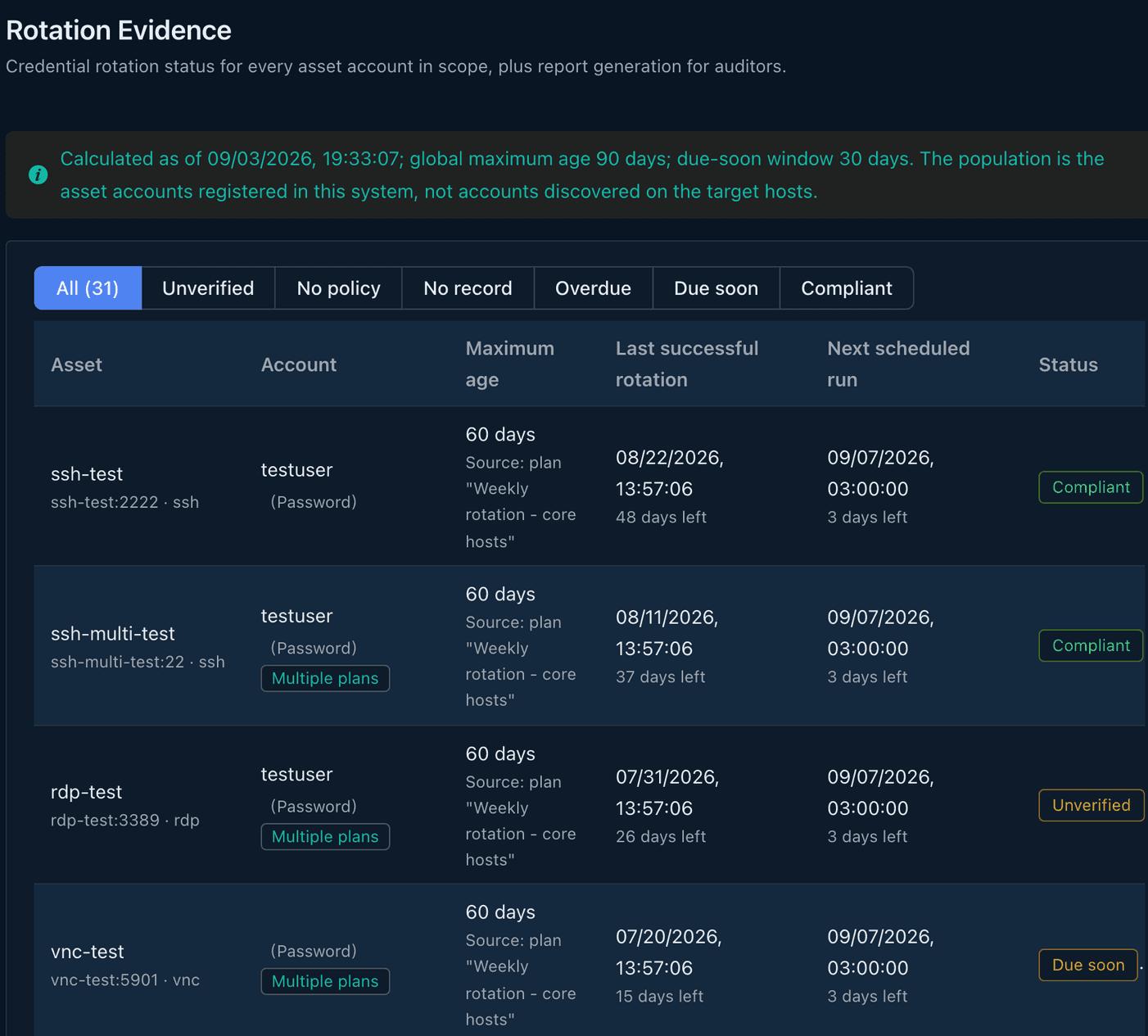
A password change counts only after it verifies itself
If you skip thisA scheduled change finishes, and only then does anyone find they cannot sign in.
MechanismThe new secret is a candidate first. It is submitted only after a sign-in on the target succeeds. A failure does not advance the version. The same account name can run across many hosts in one go.
EvidenceThe rotation evidence report answers, per account, how long it has gone without a change. Each host succeeds or fails on its own.
05
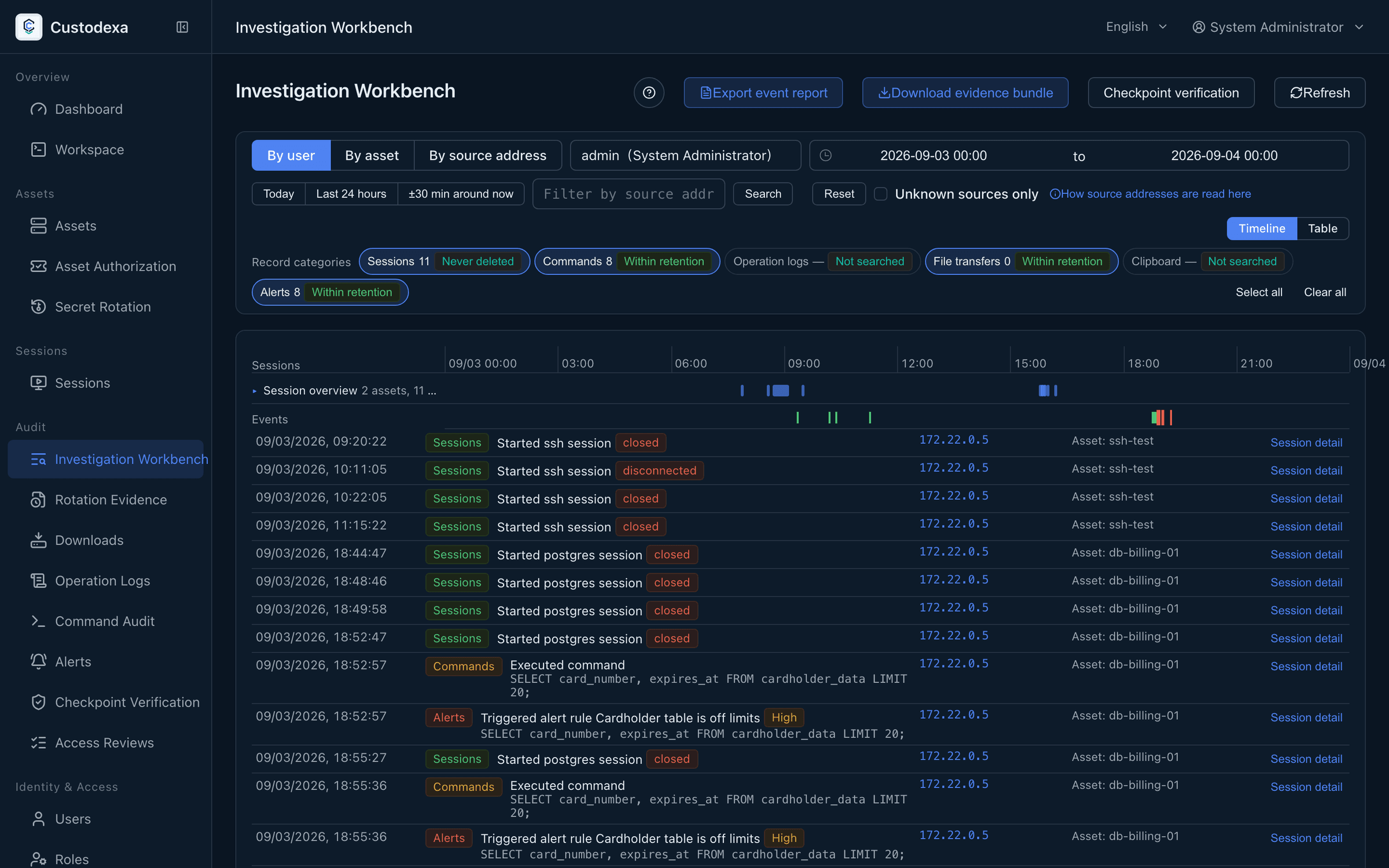
The recording decides, and the chain still knows who held power
If you skip thisAfter the fact you can prove what was done, but not who was an administrator at the time.
MechanismEvery audit row is stamped. Checkpoints seal intervals and anchor them to an external log. The seal also signs a snapshot of role assignments.
EvidenceEvidence bundles include a manifest of their contents; signed bundles can be verified offline. The verification page shows role assignment differences. Reconciliation runs when an administrator or auditor signs in, when a checkpoint is sealed, and during verification.
01
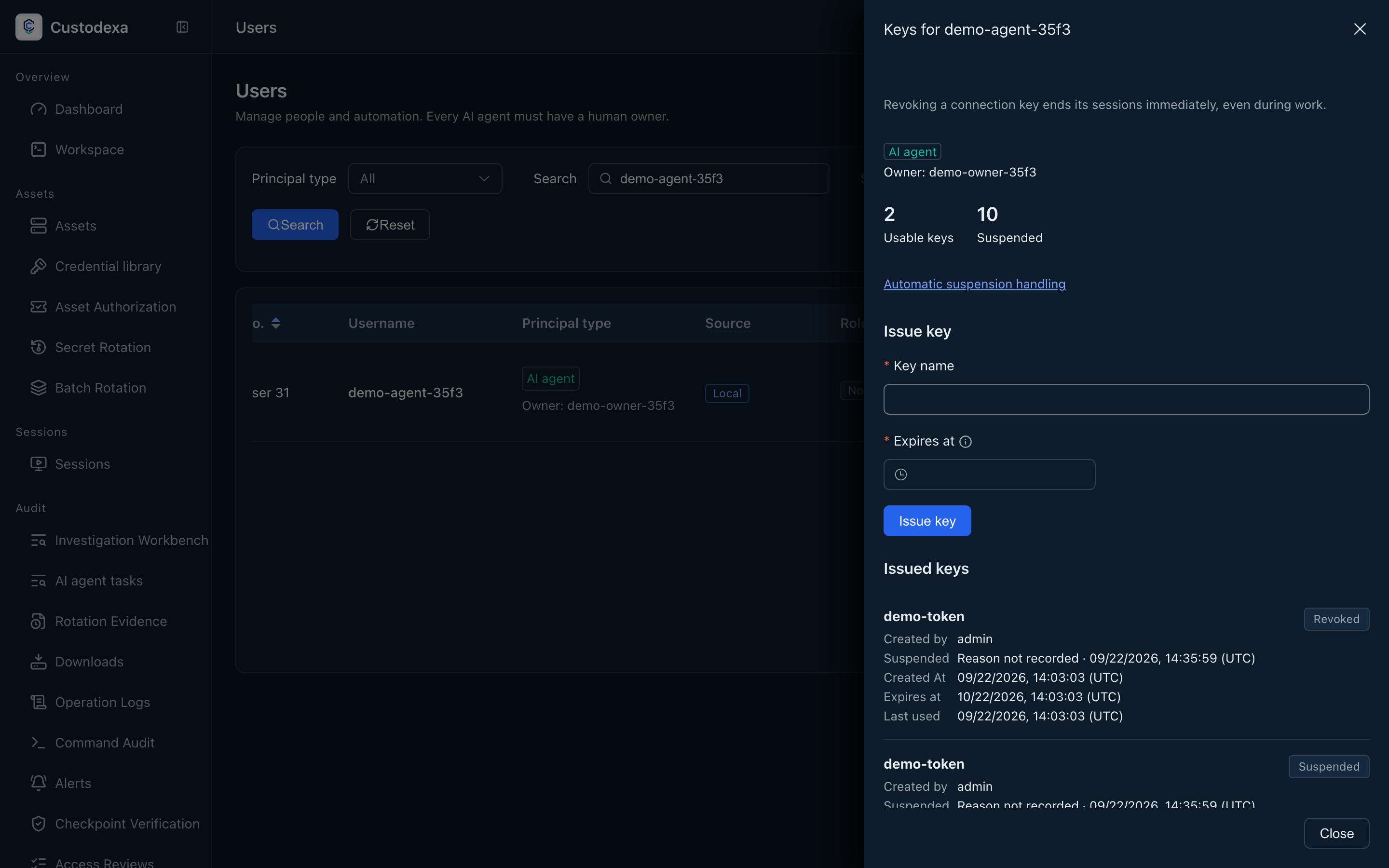
Automation actors have accountable owners
If you skip thisAutomation work needs clear attribution and approved scope.
MechanismEach AI agent has a human owner. An expiring token requests a multi-asset task, with approval per item before using managed MCP tools.
EvidenceTask details connect approved scope, sessions, the tool call ledger, and reports.
05
Take setting verdicts away for review
If you skip thisPolicy group verdicts need a snapshot that can be retained.
MechanismThe compliance map generates a report for one active group in three languages, with PDF summary and CSV details from one dataset.
EvidenceThe Download center offers a signed ZIP with a manifest to authorized readers during its retention period.
ops
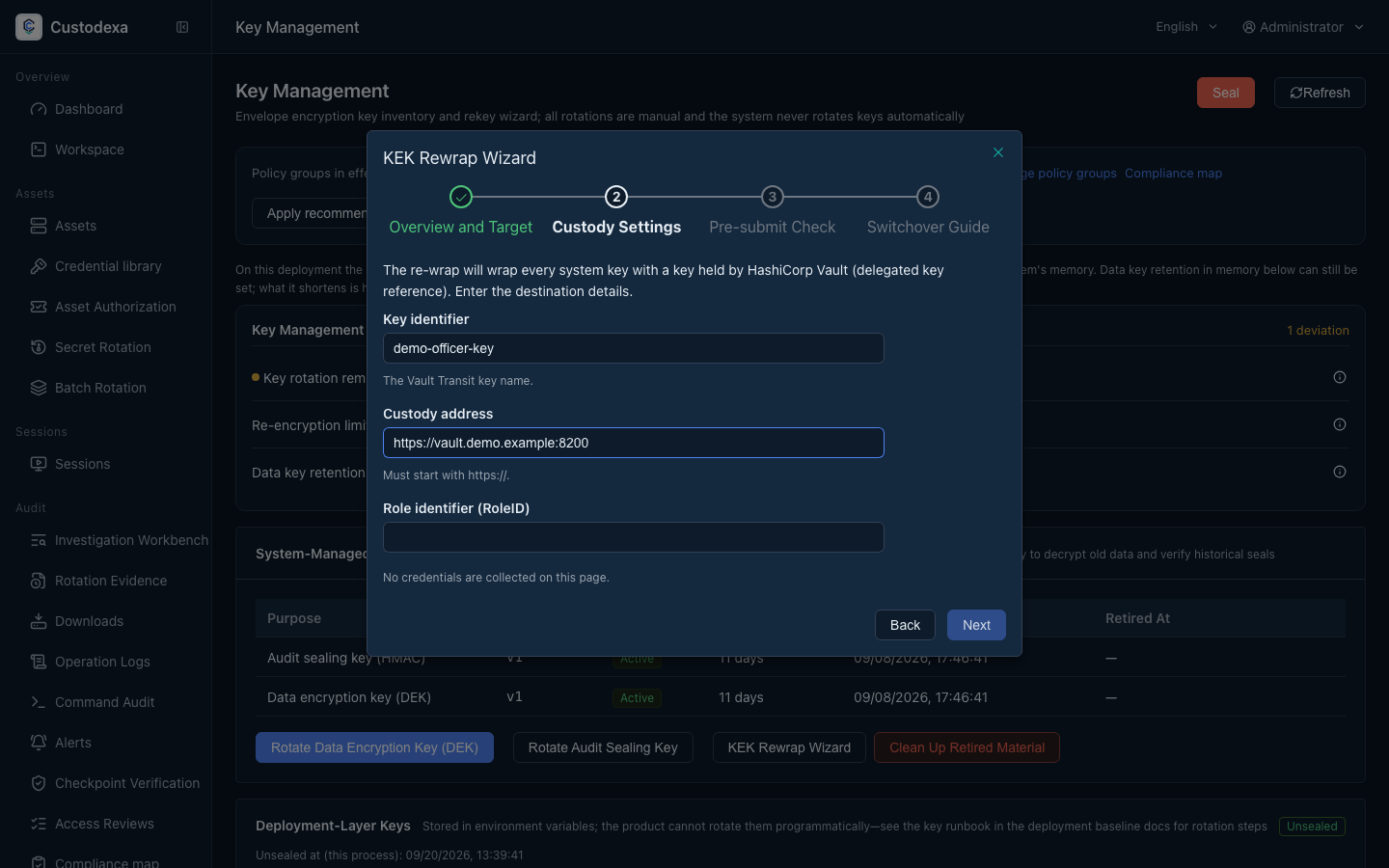
The master key sits with a custodian you already run
If you skip thisCustodian credentials sit in the deployment file for the life of the host.
MechanismData keys are wrapped by Vault Transit, AWS KMS, or GCP KMS. Custodian credentials are handed over only at unseal, live only for that unseal, and a running system can be sealed.
EvidenceTopology changes go into the audit. The rewrap wizard leaves a trail step by step.
Access, auditing, and evidence across five approaches
Approaches, not brands. Each column describes a common shape, and your environment may differ.
| Aspect | SSH jump host | VPN | Open source bastion | Commercial PAM | CustodexaYou are here |
|---|---|---|---|---|---|
| Access boundary | Usually admits the whole login host | Mostly admits a whole network segment | Mostly grants per single target | Mostly grants per single target or account | Every asset can be set to direct connection, reason required, or approval required |
| Client installation | Users bring and configure their own connection client | Tunnel software is installed on the user's device | Mostly connects through a browser | Depends on the implementation; some need a dedicated client | A browser is enough to connect, and users install nothing |
| Approval before connecting | Usually no approval step before a connection | Usually authorized once, when the tunnel is built | Depends on the implementation; mostly no per-connection approval | Mostly carries a request and approval flow | A multi-asset task approves account scope and time window per item, creating time-limited authorization at approval |
| Session recording | Usually leaves system login records | Usually leaves connection start and end records | Text and graphical session recording is common | Mostly carries session recording and playback | SSH, RDP, VNC, and the database console are recorded end to end and play back |
| Database statement auditing | Database access mostly falls outside its reach | Bounded at the network layer, with no parsing of application statements | Depends on the implementation; mostly covers some protocols | Depends on the edition; some carry statement-level auditing | Database statements are recorded before they run, and dangerous ones can be blocked as they happen |
| Evidence packaging | Mostly assembled from logs by hand | Connection logs are assembled by hand | Mostly offers export of records and recordings | Mostly offers reports and exports | One ZIP holding a manifest and a signature, with per-file hashes that verify offline |
| Offsite copies | Mostly carried by the backup mechanism already in place | Carried by the log forwarding already in place | Depends on the implementation; some support object storage | Depends on the edition; mostly offers archiving options | Uploads to S3-compatible or GCS object storage, with a custody ledger |
| Credential rotation | Target account passwords are mostly maintained by hand | Tunnel accounts are mostly maintained by a directory service | Depends on the implementation; mostly maintained by hand | Mostly carries scheduled rotation | Scheduled password rotation for Linux and Windows accounts, with a rotation evidence report |
| Deployment shape | One login host exposed to the outside | A gateway appliance or a cloud service | Mostly a single self-hosted service | Mostly an appliance or a subscription service | Linux packages for two architectures with verified images and offline bundles; source deployment is also available |
| License | Follows the license of the operating system components already in place | Depends on the implementation; open source and commercial both exist | Mostly under an open source license | A commercial subscription or a perpetual license | Open source under AGPL-3.0, with source you can review yourself |
The reading criteria and verification date for each cell are on the comparison page in the docs.2026-09-04
The docs follow the same diagram
Each of the five layers on the first screen is its own chapter, with getting started, operations and the comparison around them.
Start with the release package.
Download the 1.13.0 release files, verify SHA-256 and Sigstore data, extract the package, then install. Offline sites can load the architecture-specific image bundle first.
sha256sum --ignore-missing -c SHA256SUMS
sudo tar -xzf custodexa-1.13.0.tar.gz -C /opt
sudo /opt/custodexa/custodexa.sh install

# Source deployment
git clone https://github.com/custodexa/custodexa.git
cd custodexa
bash scripts/quickstart.sh --up